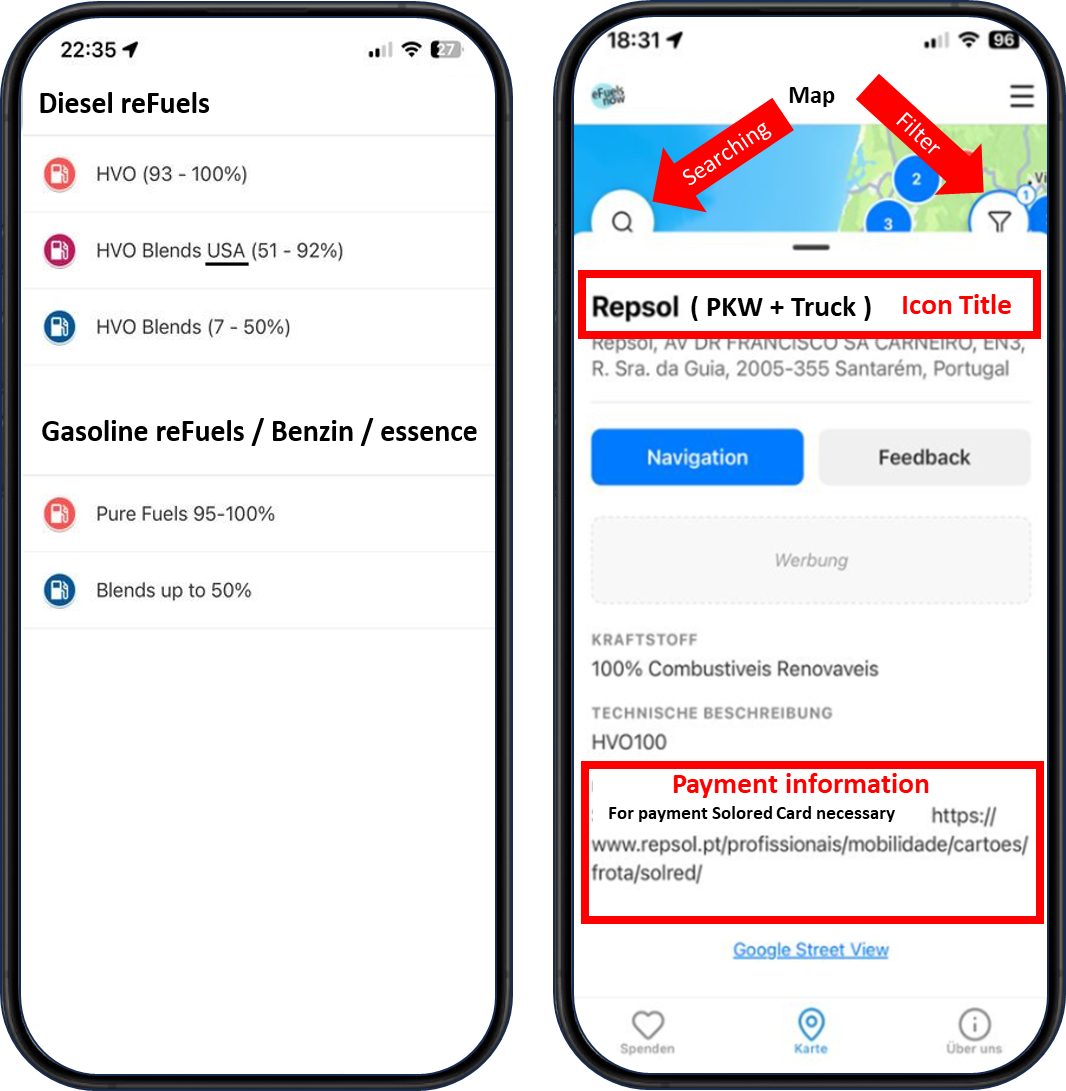
• Product name (e.g. NesteMy / HVOlution, ARAL Ultimate etc.)
  • Proportion of HVO / reFuel (%) of total fuel
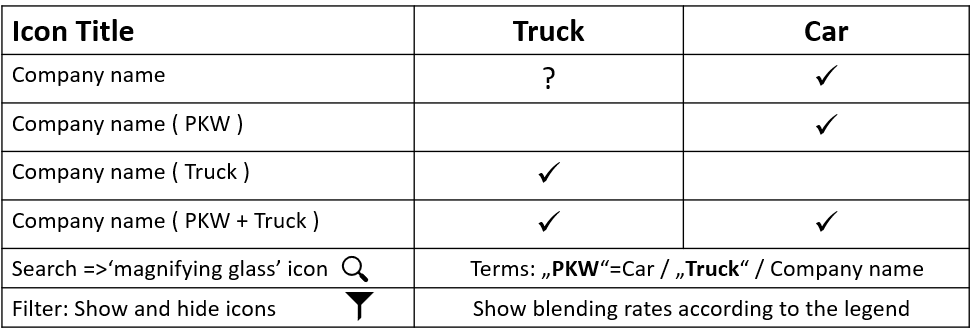
  • Car or truck pump? Read the table.
  • Pump number
  • Information regarding pay terminals and the necessity of fleet cards
  • Description of the location.

If you’re stopping at a truck station in your passenger car, that doesn’t have to be a problem. You can still fill up with HVO. For more information, click on the link for the menu item ‘reFuel Prices & Payment Information’ (tab 3). There you will find refuelling instructions
he following overview is intended to break down what the station map can and cannot do:

  • Please note that this map is maintained on a volunteer basis by an association, not a company. We strive to keep the map as current as possible. Anyone can help by providing precise (!) feedback via the feedback button, which we will then verify. Please keep in mind that the primary focus of the map is supporting university research on the fueling network and raising public awareness. For this reason, 10% blends and public fleet card stations are displayed as well.

  • The station map provides an overview of renewable petrol and diesel fuels in pure form and as blends. Fuel options between 93% and 100% are shown in red. Blends are displayed in blue, and higher blend ratios (over 50%) are shown in purple.

  • The app data is recent (a few days old), but not updated daily, as we currently cannot perform daily updates. You can find the most up-to-date information on the respective Google Maps for diesel and petrol on our website (www.efuelsnow.de). From there, the data is regularly transferred to the app. This transfer process requires a fair amount of effort, so short-term adjustments to minor details usually do not justify an immediate update. We only roll out updates once a significant number of new stations have been added. Most updates are carried out at the beginning and end of each month.

  • You can customize the displayed fuel types using the filter (funnel icon in the top right corner of the map view).

  • Using the magnifying glass (top left of the map view), you can search specifically for nearby stations by entering ‚Truck‘ or ‚PKW‘ (Car). We intentionally omitted a direct filter option (like the one for fuel types) for now, as it would not yield reliable results. Station operators and databases provide either no information or partially misleading data on this. Thanks to user contributions, our database is likely already the most accurate source for distinguishing whether HVO stations are suitable for cars or trucks. If only the fuel station name (e.g. ENI or AVIA) appears in the icon header, passenger cars can definitely fill up there. Otherwise, ‚PKW‘ or ‚Truck‘ is very often indicated right next to it. Please refer to the table in Chapter 1 for more details.

  • The map focuses on fuels with a renewable content between 10% and 100%. Most stations on the diesel map offer high-percentage HVO100 or US-based HVO80 and HVO99 fuels. Biodiesel-containing fuels are only displayed if they are blended with HVO. The petrol map focuses on bionaphtha reFuels and Super E20. E10 petrol is only published in combination with bionaphtha. E85 cannot be used by standard petrol vehicles without conversion, which is why it is currently omitted from the petrol map.

  • Currently, specific fuel prices are not displayed, as no 100% reliable pricing data exists for HVO. All available HVO price information is based on user reports, which means data is not as precise as what drivers are used to for conventional fuels. While our community is large, it is not yet big enough to provide daily price updates. However, we are considering how to expand the app’s functionality in this regard. It depends on whether users would be satisfied with price estimations. Even with daily updates, some information (e.g., abroad) would still be several days or weeks old, as most of our users reside in Germany, Austria, and Switzerland. Furthermore, we cannot predict how many users would actually report prices, and these reports would need to be accurate to truly benefit the community. Purchasing external data is expensive and also delivers inaccurate information. The question remains: Is it worth the effort just to display an approximate price?

  • The map does not offer live tracking of individual fuel tank levels. Such apps simply do not exist, nor is this data made available on the websites of major oil companies.

  • Every driver has faced an out-of-service fuel pump at some point. An app cannot prevent this. Sporadic supply bottlenecks can happen with any type of fuel. Pumps may occasionally be temporarily closed for technical inspections, maintenance, or similar reasons. Sometimes, pumps are delayed in the approval process—a procedure that can occasionally take months if local bureaucratic hurdles stall official clearance.

  • Implementing a route planner along HVO fuel stations is difficult to achieve. Even the oil companies themselves don’t always know exactly where car vs. truck nozzles are installed. Thanks to our users, we often know more than some of the providers themselves. To ensure a reliable routing feature, we would either have to significantly reduce the total number of stations—limiting the map only to those with 100% verified data regarding nozzle sizing—or I would have to individually identify and tag thousands of stations so that only confirmed details are used for route planning. On top of that, there are still a few countries where HVO can only be purchased using specific fleet cards (Portugal, for instance). A trip from Munich to Lisbon could result in suddenly standing in front of a heavy-duty truck nozzle in France or being unable to pay in Lisbon because you didn’t apply for a ‚Repsol-Solored‘ card in advance. In such cases, you can only fill up if the cashier turns a blind eye—which happens, but isn’t something you can rely on.

  • In the icon details, you will find fuel information, on-site descriptions, payment options, details on prolonged approval processes, hidden payment terminals, and more. Short-term disruptions (lasting just a few days) cannot be displayed, as we are unable to update the data daily. You will also occasionally find price notes there. For example, if you tap on a Danish station, the text highlights the very high costs. Conversely, for Livigno (a special tax zone in Northern Italy), you will find information on particularly low fuel prices. Be sure to pay close attention to the product names listed there as well. HVO fuels go by many different names and are not always labeled as ‚HVO‘, ‚Klimadiesel‘, or ‚XTL‘. A high-percentage HVO blend might even be labeled as ‚Diesel B7‘ while still containing 40% or 50% HVO. You can find detailed images and instructions in the menu under ‚Product Info on Available Fuels‘.

  • The main menu (top right) provides access to further technical details, expert interviews with scientists, and travel reports.

  • Fuel stations can always change their product names, offerings, or status. Please report any changes you encounter. Guidelines on how to send feedback can be found in a dedicated section further down this page.

Thank you to our community for all the valuable feedback and updates! The following section explains what information is most useful for keeping our station map complete and up to date.

  • Here is the key information we are looking for:
    Nozzle type (Car / Truck)
    Pump number
    Payment methods
    Product names
    Removed stations
    New stations
    Location details
    Photos

  • Even though it is not yet mandatory in the app, we kindly ask you (in your own interest) to always provide a working reply email address. Otherwise, we may not be able to process your information or help you further. Occasionally, users write to us saying they couldn’t find a hidden fuel pump. Sometimes we have the right answer, but cannot notify you without an email address. In addition, we sometimes have follow-up questions to better understand your request (as shown in the next point).

  • Please avoid brief messages like ‚No HVO‘. Unfortunately, we cannot derive any useful information from that. (A phrase like that could mean ‚out-of-service pump‘, ‚empty tank‘, or ’no pump found‘.

  • Short-term status changes, such as sporadic outages at HVO stations, cannot be tracked in real time because we are unable to update the app on a daily basis. In fact, real-time data like this isn’t even displayed on the websites of major oil companies. Additionally, users sometimes incorrectly assume that a blocked pump means HVO sales have been permanently discontinued. In most cases, however, it is merely a temporary supply issue. You are always welcome to send us this information so we can investigate the cause, but our primary focus is on pumps that are permanently out of service or newly installed.

  • Please make sure to check the icon info before getting in touch. For instance, we occasionally receive early requests to remove a location that is actually marked as pending approval in the icon details. We love hearing from you once a pump is officially unlocked for use, but please hold off on reporting until it’s active.

  • Payment Cards: We cannot list every single payment card individually. It is sufficient to let us know whether payment was possible using a debit or credit card, or if a specific fleet card was required.

  • As a general note: The daily updated Google base maps for renewable diesel and petrol are available on the eFuelsNow website (www.efuelsnow.de). We sync these into the app every few weeks. Although the app’s data is still quite current (a matter of days or weeks), daily updates aren’t feasible due to the complex processing involved. As a rule, updates take place around the end and the beginning of each month, which is when the majority of new fuel stations are registered. We are already working on streamlining this process.

Occasionally, users are unable to locate a fuel pump on site. We analyzed these feedback reports and compiled them into this ‚Search Guide‘. In about 40% of cases, the pump was successfully found using these tips.

  • Step 1: Look for the product name listed in the app and the XTL sticker (for HVO). HVO fuels in particular can be confusing due to their many different brand names: HVOlution, DieselMaxx, Neste My, EvoUltra, Nexa Diesel, etc. Note that outside the EU (e.g., in the UK), the XTL sticker is not standard everywhere.

  • Step 2: Make sure to check your filter settings in the app and pay attention to the icon color. In the map view, you can find the filter icon (funnel symbol) in the top right corner. Blue icons represent fuel blends, such as ‚Aral Ultimate‘. If you are looking for HVO100, navigating without checking the filter settings and the icon details could lead you to the wrong pump. HVO93–100 is always marked in red.

  • Step 3: Look for the pump in the truck area of the station if you cannot find it in the passenger car section. Checking the truck area is very often helpful. HVO is a specialty fuel and not mandatory for stations to offer. These pumps are frequently located in a separate area behind the main station building, often without a roof. By the way: Even truck fueling stations can have standard passenger car nozzles installed. If they don’t, the eFuelsNow team occasionally refuels their cars using adapters.

  • Step 4: Inquire at the counter. Keep expectations realistic, but it’s always worth asking. In our experience, local staff may not always know the full range of fuels available, particularly when it comes to HVO. Supply logistics are handled by corporate headquarters, which is typically a better source for info on inventory shortages or pending pump releases. Station employees rarely receive these behind-the-scenes updates.

  • Step 5: Contact eFuelsNow. You can report such cases directly using the feedback button. We investigate every individual issue, and as long as you provide a working email address, we will send you updates. As a rule, we then call the station operators and check publicly available information.

  • Important note: If you come across a locked or out-of-service pump, this does not mean it is still in the approval process or that HVO sales have been discontinued. Most often, it’s simply a temporary supply bottleneck. These don’t happen constantly, but they do occur from time to time, just like with other fuels. However, many HVO drivers are so convinced by the fuel that they don’t want to refuel with anything else!

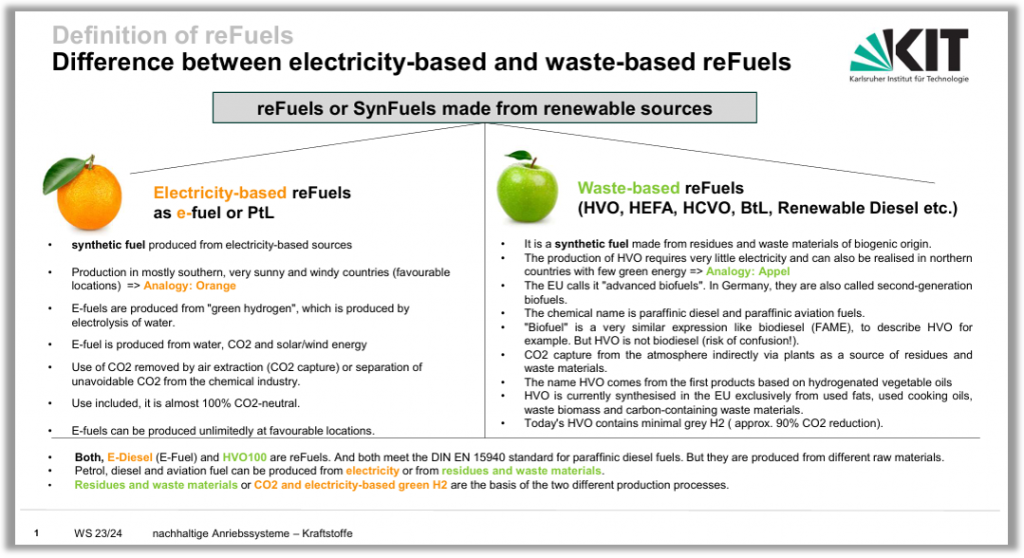
Just like any standard fuel app, this app allows you to search for stations nearby. To use this feature, you can optionally grant GPS location access after installation

Location permission is optional and used strictly for map orientation so you can spot stations faster. Clicking the ‚Navigation‘ button routes you to your chosen station via Google Maps, which manages all navigation. eFuelsNow never creates movement profiles or stores user tracking data. You can adjust or revoke location access at any time through your device settings.

GPS location access can be disabled again via your device’s general app settings. This process takes place outside the app, in the section of your operating system where all apps are managed. Here is how to do it on Apple and Android devices:

Apple:
Settings
Apps
eFuelsNow
Location

Android:
Settings
Apps – eFuelsNow
Permissions
Location

Please note that the navigation path to location settings might differ slightly based on your device’s operating system version.

Occasionally, the Android app encountered an issue where the donation prompt displayed repeatedly when exiting the station details screen. Our Austrian eFuelsNow team member, Manfred, recorded a video demonstrating how to resolve this. This bug will, of course, be resolved in a future update. Until then, thank you for your patience—please refer to the video guide here (in German language):

All rights reserved

Copyright / Privacy Policy

The website and the information it contains may be cited and linked to for academic and journalistic purposes (please cite the source: eFuelsNow). The map data is protected by copyright. Reproduction or use of the data in third-party applications is not permitted! Furthermore, the map is updated almost daily. New station data is constantly being added, and important information is subject to change (e.g. regarding payment, blend levels, etc.). If you have any further questions, please contact us by email.

Transparency notice regarding environmental information:

All statements on the entire eFuelsNow website and in the eFuelsNow smartphone app (eFuelsNow MAP) regarding CO₂ reduction and cleaner local combustion are based on official DIN standards (e.g. DIN EN 15940) and certified sustainability certificates (RED II/III). The specific reduction figures (e.g. up to 90% CO₂ compared with fossil diesel) vary depending on the origin of the raw materials and the vehicle model. Here are some examples of source references => Neste about CO2-Reduktion of NesteMy / ADAC about local Emissions / KlimaBenzin95 / Repsol Nexa 95 /